Start in 5 minutes
Install an adapter, get a key from the dashboard, verify a request, and see it in the usage chart.
By the end of this page your API answers 200 to a kr_test_ key, 401 to no key, and the request shows on the key's usage chart in the dashboard.
Install an adapter
Install the adapter for your framework. It brings @keyring-dev/sdk, @keyring-dev/cache and @keyring-dev/core with it.
npm install @keyring-dev/expressSwap express for fastify, nest or next to install the adapter you use. The framework itself is yours to install: npm install @keyring-dev/express brings the SDK, not Express. On a framework with no adapter, install the SDK and call it directly — it is four calls:
npm install @keyring-dev/sdkNode 22 or later is required.
Get a key from the dashboard
Sign up at app.keyringdev.com and create a workspace. Then, in the dashboard:
-
Settings → Secret keys → New secret key. A
krsk_live_…secret key is the credential your server uses to talk to the control plane. It is shown once, on that page, and never again: copy it now. -
Projects → New project. A project is one API of yours. Open it and copy the Project ID shown on the project's page.
-
Tenants → New tenant. A tenant is whatever you'd put on an invoice — an organisation, or a user account if you have no org concept. Give it your own id for them as
external_id. -
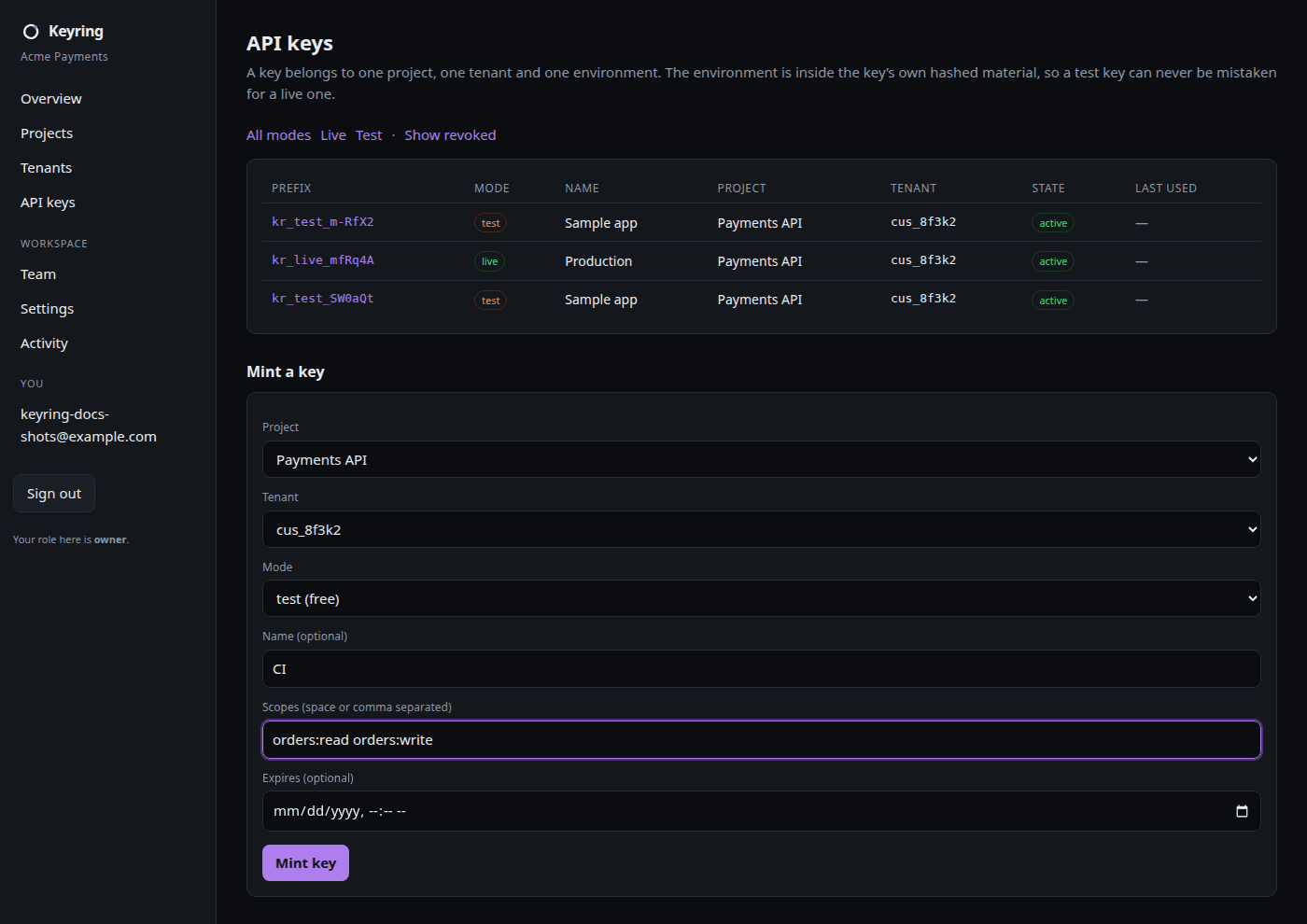
API keys → Mint a key. Pick the project, the tenant and test mode. The
kr_test_…key is shown once.
Set three variables in your app's environment. KEYRING_BASE_URL is the control plane your server polls: https://api.keyringdev.com.
KEYRING_SECRET_KEY=krsk_live_...
KEYRING_PROJECT_ID=...
KEYRING_BASE_URL=https://api.keyringdev.com
Verify a request
Every sample below is executed against the real packages by packages/docs/src/samples.spec.ts before it is published.
import express from 'express';
import { keyring } from '@keyring-dev/express';

const liveOrders = [{ id: 'ord_live_1', total: 4200 }];
const testOrders = [{ id: 'ord_test_1', total: 100 }];

const app = express();
app.use(
  keyring({
    onUnavailable: 'stale-then-closed',
    resources: {
      orders: { live: liveOrders, test: testOrders },
    },
  }),
);

app.get('/v1/orders', (req, res) =>
  res.json({
    tenant: req.keyring?.tenantId,
    env: req.keyring?.env,
    degraded: req.keyring?.degraded,
    orders: req.keyring?.orders,
  }),
);

app.listen(Number(process.env.PORT ?? 3000), '127.0.0.1', () => {
  process.stdout.write('listening\n');
});
Start it and call it with the test key:
curl -H "Authorization: Bearer kr_test_..." http://127.0.0.1:3000/v1/orders{
"tenant": "01a0...",
"env": "test",
"degraded": false,
"orders": [{ "id": "ord_test_1", "total": 100 }]
}The handler was given the test list because the key is a test key. Mint a live key for the same tenant and the same handler returns the live list. Call it with no key:
curl http://127.0.0.1:3000/v1/orders{ "error": { "code": "invalid_key", "message": "Invalid API key." } }Every denial looks like this one. The reason a key was refused travels to your usage data, never to the caller.
The samples fail closed on a cold start
Every sample above sets onUnavailable: 'stale-then-closed'. The SDK's
default is stale-then-open: a process that has not loaded its first policy
snapshot admits any well-formed key unverified until it does, including one
minted locally with @keyring-dev/core and never registered.
stale-then-closed instead answers 401 to any key the cache cannot prove.
The trade-off: while a freshly started process cannot reach the control plane,
it refuses every request, including ones with valid keys; once a snapshot has
loaded, keys it holds keep working through an outage. When Keyring is
down has the full table, and a money
route sets onUnavailable: 'closed'.
See it in the usage chart
Open API keys in the dashboard and click the key. The Usage section is a per-day chart of requests and errors for that key over the last 30 days, and the request you just made is in it once the SDK's telemetry batch lands: the SDK flushes every second or every 1,000 events, whichever comes first.

The same numbers are one call away:
curl -H "Authorization: Bearer krsk_live_..." \
  "https://api.keyringdev.com/v1/keys/$KEY_ID/usage?days=7"
{
"object": "usage",
"key_id": "01a0...",
"days": 7,
"data": [{ "day": "2026-09-15", "requests": 1, "errors": 0 }]
}There is no per-request explorer yet. Request logs says what is there today.
Next
Onboarding walkthrough
Everything the dashboard can do, in the order you will do it.
Test mode
What a test key can and cannot reach, and why it is free.
Your framework
Mount points, per-route rules and idempotency for each adapter.
Stuck on any of this? hello@keyringdev.com.